
Your shop.
Your stock.
One workspace.
Bring your in-store checkout, products and connected online orders together with DFS POS System.
Ask for a demo ↗Windows desktop POS with browser access.
Provided by DFS Racing (M) Sdn. Bhd.
A clearer view of the
work behind every sale.
Build a cart.
Keep checkout moving.
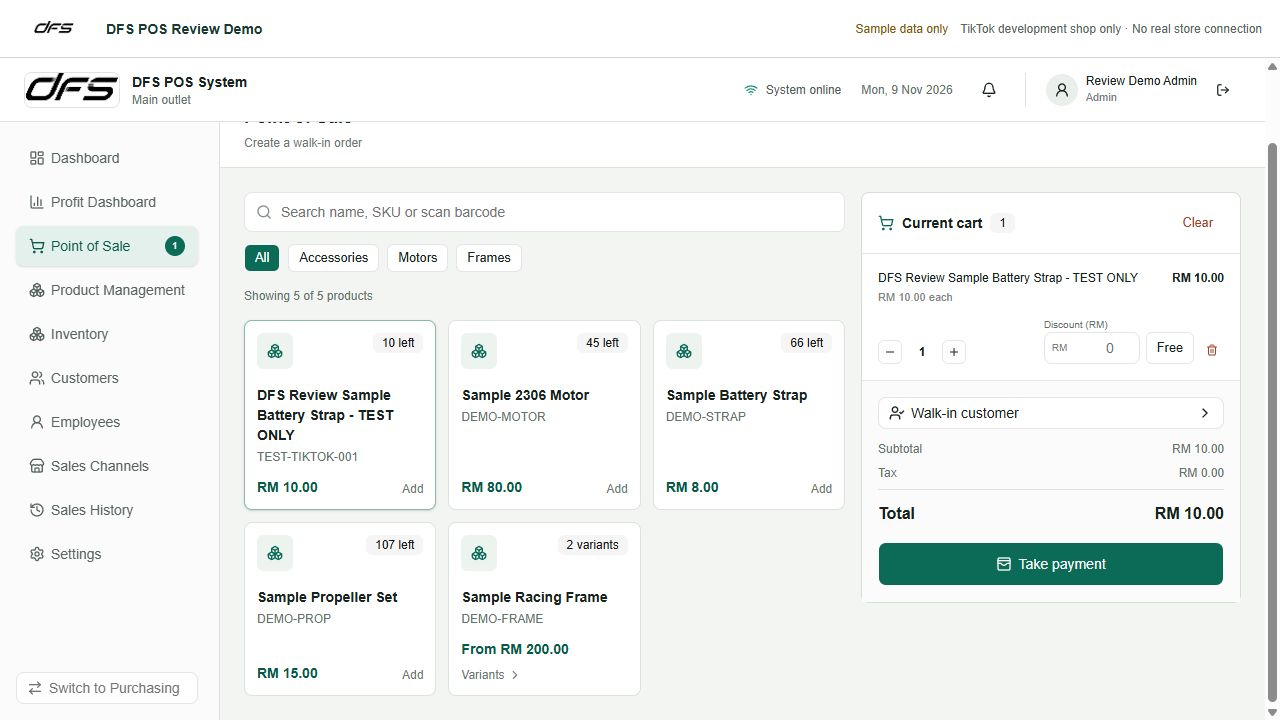
Find a product by name or SKU, scan its barcode, choose a variant and adjust quantities. Apply item discounts, take payment and send an email receipt when configured.
- Customer records and sales history
- Product variants and bundles
- Inventory updated when a sale is completed
Understand each
stock movement.
Manage product SKUs, supplier information, unit costs and landed costs. Use stock checks, reorder alerts and inventory history to keep records useful for the next decision.
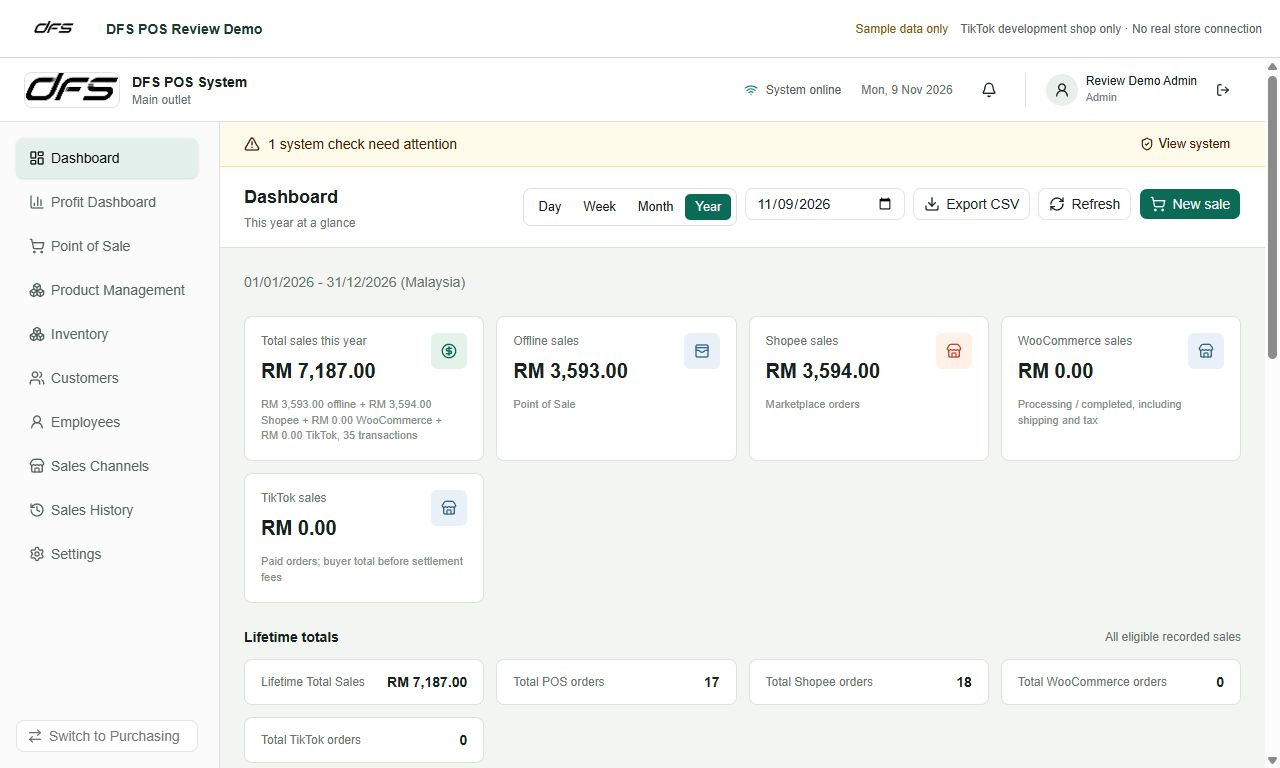
Purchasing records help estimate landed costs and receive arriving items into inventory. Sales and profit reports support day, week, month and year views.
Know your costs.
Plan your profit.
Move from checkout to purchasing in the same system. Track supplier orders, calculate landed cost and try selling prices to see your estimated gross profit and margin before you sell.
- Create your supplier order
Select a supplier, add the invoice, currency, items, discounts and quantities. Record the Ringgit paid to calculate the exchange rate.
- See the full landed cost
Keep merchandise unit cost separate from shipping and tax. Include forwarder charges and their own exchange rate, then adjust your proposed selling prices to compare margins.
- Stock arrives? Confirm it.
Choose Receive items, enter the quantities that arrived and click Confirm arrival. POS inventory updates automatically, including partial deliveries.
- Complete the purchase
Once everything has arrived, confirm final shipping and tax, then click Complete & submit. The latest applicable unit cost and landed cost are saved to your POS products.
Let your stock records
follow the order.
Authorize a supported store, match Seller SKUs and choose when automatic inventory processing begins.
Connect & match
Link the right shop and map listing variants to POS products. Review missing or conflicting SKUs.
Import & deduct
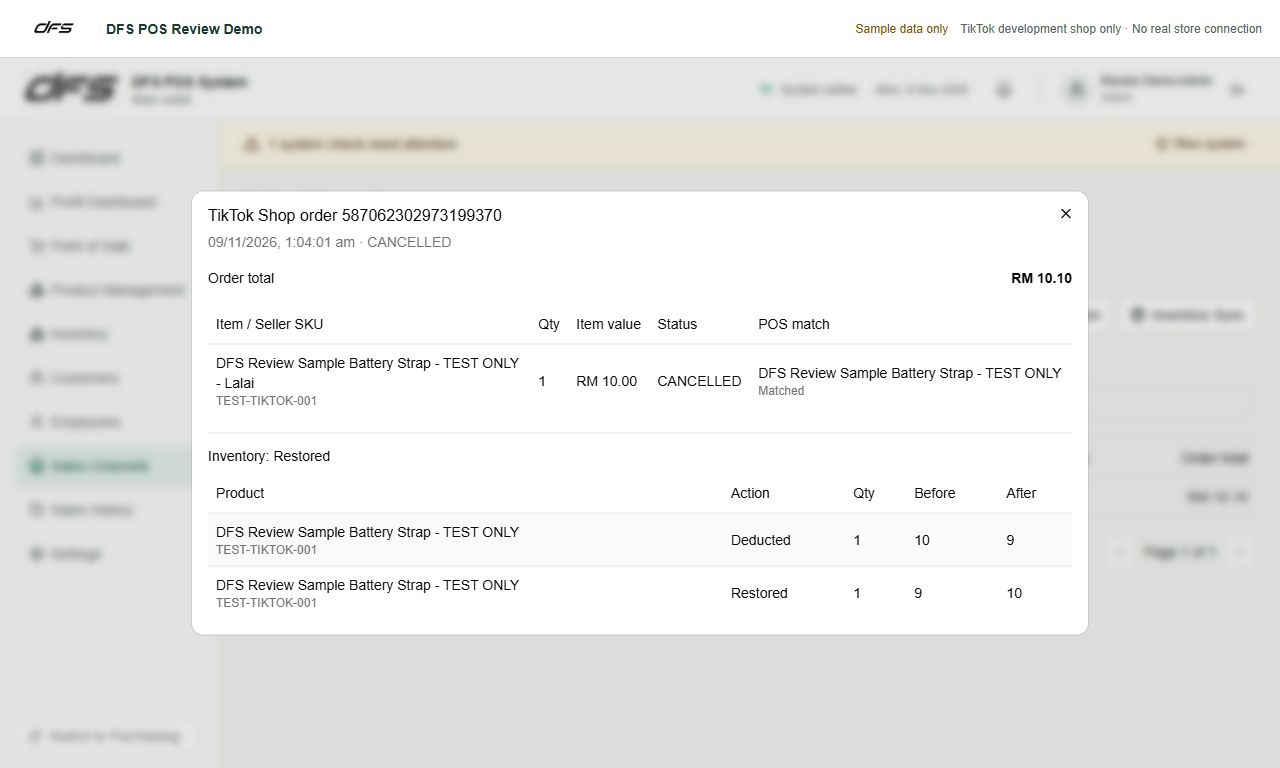
Eligible new orders deduct inventory once. Repeated imports are protected against duplicate deductions.
Restore & publish
Cancellations restore previously deducted stock once. Enabled publishing sends quantities to verified listing links.
Store authorization, supported permissions and enabled sync settings are required. Feature availability depends on each platform and the permissions granted to your shop. Screenshots use a separate development shop and sample records.
Your business database
stays with you.
DFS does not host your main POS database. Your inventory, customers, sales and purchasing records are stored on your designated Windows PC. You manage your records and choose where to keep your backups.
Your own computer
Keep your business records in your own installation. Export customer, inventory, sales and profit reports when you need them.
Your own Google Drive
Connect your Google account and schedule encrypted backups every 1, 3, 6 or 12 hours, or daily. Use your backup and encryption password to restore when moving to another computer.
Your POS PC must be running and online for scheduled Drive uploads. Keep your backup password safe. Connected services still process information needed for licensing, store authorization, synchronization and email delivery. Read the Google Drive backup privacy information ↗
Start with an everyday PC.
Connect your whole team.
A suitable Windows PC runs DFS POS and keeps your business database. No dedicated enterprise server is required. Other computers, tablets and phones open the same POS in a browser.
Your shop PC
DFS POS + your business database
One licensed server computer, kept on and awake
Local network sharing
Shop PC ↔ same Wi-Fi / LAN ↔ browsersIncluded · no extra device feeOpen the shared local link on your PCs, tablets or phones. Each user signs in to the POS.
Remote Access
Shop PC ↔ secure internet link ↔ your deviceOptional · RM200 / yearUse mobile data or another Wi-Fi network. Pass the approved-email access check, then sign in to the POS.
Your Google Drive
Shop PC → encrypted backup → your DriveYour account · your backupsChoose your schedule. Restore with your backup password when changing computers.
Unlimited local browser devices
Connect additional PCs on the same local network without an extra per-device licence charge. They share one licensed POS server, rather than each running a separate database. Practical simultaneous use depends on the host PC and network capacity.
Check your shop from outside
Optional Remote Access provides a protected HTTPS link through Cloudflare. Keep the shop PC powered on, awake and online. No router port forwarding is needed; remote devices need an internet connection.
We can help confirm a suitable computer for your catalogue and team. Local sharing requires the same reachable shop network, usually the same router. Using a different network requires Remote Access.
One POS licence.
Room for your whole shop.
Choose the annual POS licence, then add remote access if you want to check your shop while you are away.
Your shop workspace
Equivalent to RM50 per month.
Billed annually at RM600.
- One designated Windows server PC
- POS, inventory, sales and profit reports
- Purchasing, landed cost and margin estimates
- Unlimited local browser devices, no extra device fee
- Google Drive backup connection
- Supported sales-channel connections
Remote Access
Added to your DFS POS licence.
Billed annually.
- Access from outside the shop network
- Use your phone, tablet or computer browser
- Protected HTTPS connection
- Approved-email access check and POS sign-in
- Uses your existing shop PC and database
POS + Remote Access: RM800 per year. Local network sharing is already included in the RM600 POS licence.
Prices are in Malaysian Ringgit. Hardware, internet service and any Google Drive storage plan are separate. Sales-channel connections require store authorization and the relevant platform permissions.
Set up for the way
your shop works.
Start with the RM600 annual POS licence. Contact us for installation and onboarding, and add Remote Access for RM200 per year if needed. We will help you prepare your catalogue and configure your connections.
Try the demoWhat you need
A Windows server computer
The POS database is stored on your designated Windows PC. Keep it running and connected to the internet for automatic online order imports and stock updates.
A valid DFS POS licence
One designated server PC runs your installation. Other devices can use browser access when local sharing or remote access is configured.
Store authorization and accurate SKUs
Authorize each supported store and check the product, variant and warehouse matches before enabling stock publishing. Set the inventory start date to avoid deducting historical sales.
Backup and access settings
Google Drive backup can be configured with a schedule. Admin and employee roles control POS access. Remote access requires separate setup.